Two people are staring at the same empty prompt box on a Tuesday night. One runs a small events business and wants a booking app with a calendar, deposits, and confirmation emails live by Friday. The other inherited a repository with no full-time maintainer since 2023 and a bug report from a customer who can't reset a password. Both will type a sentence into an AI tool tonight. They should not open the same one.
Vibe coding in practice means describing software in plain language and letting a model write the code, then reacting to what comes back. It works, and it remains a minority professional habit. Among 26,564 respondents to the 2025 Stack Overflow Developer Survey, 72.2% said vibe coding was not part of their professional work, while 11.9% said it was.
The ten apps below are sorted by what decides which one you open: your starting point. An empty idea, an existing GitHub repository, and a terminal-first workflow each rule out half this list before features enter the conversation. Each entry names the friction the tool removes and the limits that make it a poor fit.
Free tiers are where these products diverge fastest. A weekly AI allowance, a credit balance, a daily message cap, and a cloud bill are four different kinds of ceiling, and only some of them are visible before you commit. Generated code still needs testing, and pricing changes often enough that you should confirm current plans before you pay for a year. If your existing projects already live in a component framework, the workflow notes in this guide to AI assisted development for Vue teams are worth reading alongside the list.
Table of Contents
- 1. AppJet
- 2. Lovable
- 3. Bolt.new
- 4. Replit
- 5. v0
- 6. Cursor
- 7. Base44
- 8. Google AI Studio
- 9. Emergent
- 10. Claude Code
- Best-fit users, free tiers, and deployment at a glance
- Match the Tool to Where Your Project Actually Starts
1. AppJet
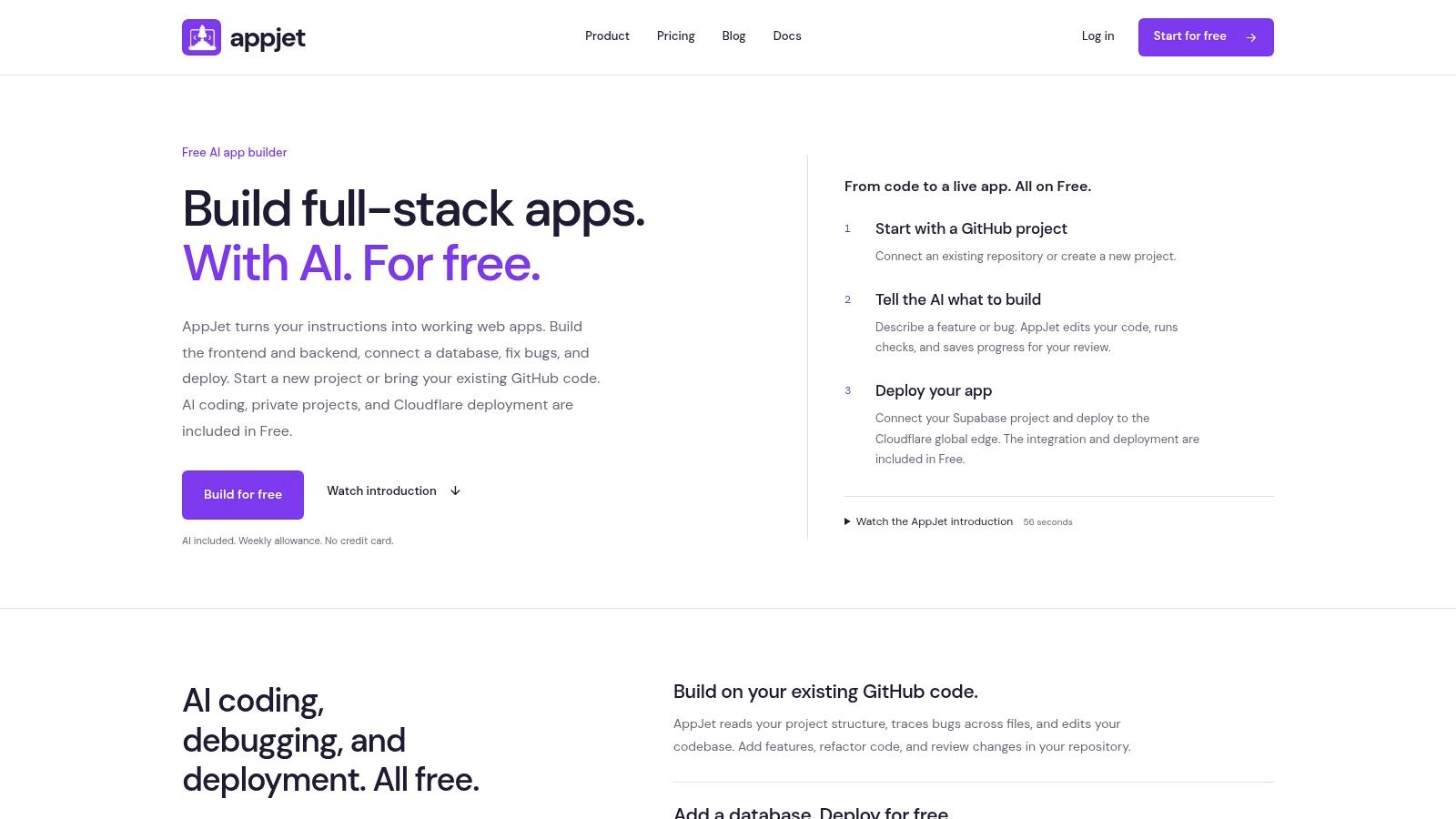
A blank repo and an existing codebase are both fair starting points in AppJet, which makes it useful when the idea is settled but the implementation is still fuzzy. You describe the project or the change you need, and the AI writes features, fixes bugs, and works across the project's structure. Changes are saved for review through GitHub and branches, so a developer can inspect the work before it lands.
Why the review step matters more than the prompt
Codebase understanding is what separates this class of tool from a chat window that forgets your file tree. Stack Overflow's 2025 survey found only 29% of developers trust AI output to be accurate, while 46% actively distrust it, and 66% name "almost right" output as their biggest frustration (Stack Overflow AI survey). A reviewable diff gives you a place to catch that "almost right" output. AppJet connects to GitHub and makes changes that account for the project's structure, components, and business logic, which is the practical advantage on an existing app.
The allowance model is easy to understand once you know where it sits. Free costs $0 per month and includes a weekly coding allowance that resets each week, is shared across all projects, and appears as a percentage rather than a message counter. The allowance resets independently of the monthly subscription renewal, so the meter you watch is weekly, not tied to a billing date.
The upgrade path is narrow. Starter costs $5 per month and includes 5× the Free weekly allowance, all Free features, custom domains, and virtual disk storage. Free already covers private projects, GitHub-connected code, task plans, verification tools, free vulnerability scanning, Supabase integration, and Cloudflare global edge deployment. Supabase is available on every plan, and the agent can add authentication, sign-in flows, object storage, Edge Functions, a Postgres database, and application data models. Deployment runs through Cloudflare's global edge, while app network settings expose the port and allow WebSocket support when persistent connections are needed.
That scope makes AppJet a good fit for a builder starting from an empty idea or a GitHub repository who wants code generation and deployment in one place. It is a weaker fit when you need guaranteed model capacity. Free and Starter use the regular model, which can be overloaded during busy periods.
- Weekly allowance, no daily cap. Free includes a weekly coding allowance shared across projects, shown as a percentage, with enough allowance each week to build and deploy a complete app.
- GitHub review stays in the loop. You can start from an empty repository or an existing codebase, describe the change, then review AI changes through GitHub and branches.
- Ownership and code handling are explicit. Users retain ownership of code and content they create, while AppJet retains ownership of the platform, AI models, and improvements to the Service. Code and interactions are not used for training on Free or paid plans. Code you keep in GitHub or leave in a running deployment remains there.
- Credentials still need care. Client-side bundles can expose values embedded at build time, so private credentials belong on the server side.
The Stockroom example is the useful proof point here. It includes an inventory dashboard, product search, stock movements, a backend, and a SQLite database, and was built and deployed entirely on AppJet Free with no paid virtual disk. That is a stronger signal than a toy landing page because it covers data entry, querying, and a deployed app. It also sets the right expectation: the Free plan can carry a complete app, while custom domains and persistent local storage require Starter.
Test the ceiling first: build the ugliest version of your real feature on Free before you upgrade. An allowance you understand beats a plan you guess at.
2. Lovable
Lovable is the prompt-first builder most non-coders land on first, and it earns the reputation. You describe an app, it generates one, and you click elements to edit them instead of hunting through files. Supabase integration covers database, authentication, and file storage; GitHub sync lets a developer take the code elsewhere when the app outgrows the builder.
- Friction removed: backend setup. Auth and tables exist before you write a line of SQL.
- Best fit: a founder validating a workflow with real users this month, not a team shipping to regulated customers.
- Watch the meter: paid plans spend credits, so cost tracks iteration count rather than seats.
Generated permissions deserve the same scrutiny as generated interface. Independent reporting on the enterprise quality gap cites research in which 45% of tested AI coding tasks introduced a known security flaw (StepTo's 2026 review). Read every row-level policy the builder writes before real customer data sits behind it.
If the credit model doesn't fit your budget, this comparison of Lovable alternatives covers what changes at each price point.
3. Bolt.new
Bolt.new sells one thing well: you never install anything. Type a prompt in the browser, edit in the browser, preview in the browser, publish from the browser. For a prototype that has to exist before a Thursday call, that absence of setup is the whole value.
The trade-off is that token consumption scales with project size. A tidy two-screen tool stays cheap; a sprawling app with a dozen components will chew through your plan faster than you expect, because every edit pulls more context.
- Strong at: landing pages, internal tools, and demos you'll throw away or hand off.
- Weak at: long-lived projects where you'll want dependency control and a local test runner.
- Free tier reality: Bolt branding on your published app, plus file-upload and usage limits.
Generated behavior still needs review, and the person who checked it last week isn't the person shipping it now. Treat the free tier as a drafting table, not a production host. The walkthrough on going from one prompt to a deployed full-stack app shows where that handoff usually breaks.
4. Replit
Replit is the closest thing here to a complete machine in a browser tab: editor, runtime, database, deployment, and collaboration in one place. The AI Agent will scaffold a project, but you can also drop into the code and finish it yourself, which matters when the first generated version is 80% right.
That flexibility is also where costs get fuzzy. Complex agent tasks consume more of your plan, and effort is harder to predict than a flat message count. Before starting a substantial build, decide what "done" looks like so the agent doesn't wander.
- Use it when: you want zero local configuration and you plan to keep coding after the AI stops.
- Skip it when: your team already has a hardened local toolchain and CI that you'd have to rebuild in the cloud.
- The hidden job: operational oversight. A deployed app is yours to patch and monitor.
A cloud workspace is a convenience, not an operations team. Someone still owns the logs, the backups, and the incident at 2am.
For teams weighing browser-based tooling against local setups, this breakdown of the cloud-based development environment is a reasonable starting frame.
5. v0
v0 is what I reach for when the project is React or Next.js and the team already deploys on Vercel. The generated code looks like code your team would have written, which sounds like a small thing until you have to review it. Import a GitHub repository, keep it in sync, preview, then ship through the same pipeline.
Framework opinion is the point. You get tight integration with one ecosystem and a smoother path from prompt to production than a framework-agnostic builder can offer, because less translation happens between what you asked for and what the platform runs.
- Where it wins: component work inside an existing Next.js app, and design-to-code handoffs.
- Where it fails: no-code users, Django shops, and anyone who needs the output to be framework-neutral.
- The free tier: a daily message limit, which you'll hit on a busy afternoon of iteration.
Previews are where the tool earns trust, because you see the change before it merges. If you're not on Vercel, budget the extra step of wiring deployment yourself.
6. Cursor
Cursor is an editor first and an AI tool second, and that ordering is why developers stick with it. Agent mode, chat, and completion all operate on files you can see, so a targeted fix stays targeted instead of regenerating a page you were happy with.
Its commercial trajectory shows how far that approach scaled. Cursor reported more than $100 million in recurring revenue in January 2025, and by June 2025 annual recurring revenue had passed $500 million, with the company stating that more than half of Fortune 500 companies used the product (Quashbugs' Cursor statistics roundup). Recurring revenue is a run rate, not audited annual revenue.
Faster generation doesn't automatically mean faster delivery. A 2026 research review reports that experienced open-source developers using AI took 19% longer to complete issues, despite predicting a 24% improvement and perceiving one (arXiv research review). The lesson for editor-based tools is to measure time to a passing test, not lines generated.
- Best for: developers working inside an existing repository who need codebase-aware edits.
- Not for: anyone who wants hosting, a database, and a publish button in the same window.
- Plan limits: paid usage is subject to plan limits and, on some tiers, usage-based charges.
7. Base44
Base44 cuts the number of decisions between an idea and a running app. Database, authentication, and integrations are assembled inside the builder rather than chosen from a menu of vendors, which is exactly what a first-time creator needs and exactly what an experienced developer finds constraining.
The platform-managed model is the deal. You get speed because the builder owns the wiring; you lose flexibility because you're working inside its conventions rather than a conventional IDE.
- Good first project: an internal tool or customer portal with logins and a data model.
- Check before committing: credit consumption, which features sit behind higher plans, and whether GitHub integration and in-app code edits are included.
- Know the exit: confirm what your export path looks like before your data lives there.
Pick a platform-managed builder when you want the wiring handled. Pick a code-first tool when you expect to outgrow the wiring within a year.
8. Google AI Studio
Google AI Studio's Build mode is the least marketed option on this list and one of the more useful for a specific job: prototyping apps around Gemini. You prompt, you iterate, you wire the Gemini API, and you can push to GitHub or deploy to Cloud Run.
The cost structure catches people. Studio access itself is available at no cost, while API and cloud usage can be billed separately, so a prototype that works beautifully on a Tuesday can generate a Cloud Run invoice by the end of the month. Set budget alerts before you deploy, not after.
- Friction removed: API key setup and server-side secret handling are part of the workflow rather than an exercise you do manually.
- Two-way GitHub sync: you can leave the browser and keep developing in your own editor.
- Ecosystem cost: tighter coupling to Google Cloud than a provider-neutral IDE.
Understand your API key scopes and deployment configuration before you hand a URL to anyone.
9. Emergent
Emergent is the most agent-led option here. You describe an application and agents build, test, and publish it, with workflows tuned for full-stack apps, mobile apps, and landing pages. If your mental model is "assign the work and review the result," this fits that instinct better than a chat-and-paste loop.
The catch is estimation. Credit consumption and publishing requirements make it hard to price a substantial project before you start, and agent-generated output still needs testing by someone who understands the domain.
- Strong fit: builders who want multiple development steps handled in one pass.
- Poor fit: developers who want to own the infrastructure and the commit history.
- Practical move: scope the first milestone tightly, then watch what it costs before promising a second.
10. Claude Code
Claude Code runs in the terminal and works on local project files. It will read a repository, trace a bug, and make changes across files, then hand deployment and infrastructure decisions back to you. Nothing is hosted for you, and nothing is hidden from you.
That makes it excellent for the developer who inherited a codebase. Ask it to diagnose and report before it edits anything, because an agent that starts rewriting on a hunch creates more work than it removes.
Separate diagnosing from fixing. Ask for the diagnosis first, then decide what gets changed.
Delivery quality is the constraint worth watching. Google's 2024 DORA research found that a 25% increase in AI adoption correlated with a 1.5% decrease in delivery throughput and a 7.2% decrease in delivery stability (DORA report on generative AI in software development). Terminal agents accelerate the edit loop; only tests and rollback discipline protect the deployment.
- Best for: code-first developers with strong review habits.
- Not for: non-coders, or anyone who expects a publish button.
- Usage: subscription limits are shared with Claude and depend on task size.
If you want the reasoning quality without the terminal, this guide to finding a better coding copilot covers the alternatives.
Best-fit users, free tiers, and deployment at a glance
| Item | Best For | Free Plan | Deployment |
|---|---|---|---|
| AppJet (Recommended) | Building or improving full-stack apps with AI | $0 plan with weekly AI allowance, private projects, and integrations | Cloudflare global edge |
| Lovable | Prompt-first full-stack app building | Limited AI usage | Integrated cloud hosting |
| Bolt.new | Browser-based prototyping and app publishing | Free tier with branding and usage limits | Integrated hosting; custom domains on paid plans |
| Replit | Cloud-based coding, learning, and deployment | Free entry option with usage limits | Built-in deployment |
| v0 | Generating React and Next.js apps | Free tier with a daily message limit | Integrated Vercel deployment |
| Cursor | AI-assisted editing of existing codebases | Free entry tier | Deployment is not a main focus |
| Base44 | Prompt-first app creation with built-in backend features | Free tier for initial exploration | Platform-centered publishing |
| Google AI Studio | Prototyping Gemini-powered apps | AI Studio access at no cost; API and cloud usage may cost extra | Google Cloud Run |
| Emergent | Agent-led app building and publishing | Credit-based usage; check publishing requirements | Publishing workflows included |
| Claude Code | Terminal-based coding on local projects | Access depends on eligible Claude plan or API | Developer-managed deployment |
Match the Tool to Where Your Project Actually Starts
Ten tools, three starting points. The sorting question isn't which app generates the prettiest landing page in a demo. It's which one survives your second week, when the requirements shift and someone else has to read the code.
- An empty idea and no engineering background. Start with a prompt-first builder. Lovable, Base44, Bolt.new, and Replit will all get a working app in front of users. Choose on backend fit and on what leaving looks like, because you will eventually want the code out.
- An existing GitHub repository. Prioritise tools that import and sync from GitHub and understand project structure. Cursor, v0, Google AI Studio, and AppJet all work from code you already have. The test is whether the diff is reviewable, not whether the demo is impressive.
- A terminal habit and a real codebase. Claude Code fits the workflow you already have. Pair it with tests and a rollback path, because the speed it adds to editing doesn't add stability to delivery.
Non-coders starting from an idea should test one prompt-first builder on a single small feature before committing a month of work. If the builder can't handle a feature you need, credits and plan tiers won't fix that. Developers with an existing repository should prioritise tools where ownership stays clear and where changes arrive as reviewable diffs rather than a rewritten file tree.
What to verify inside the free plan
Before you pay, check four things in this order. Current free-tier limits, since a daily message cap and a weekly allowance fail differently. Credit or allowance rules, because credit-based pricing scales with iteration and iteration is what you'll be doing most. Deployment costs, which often sit outside the subscription entirely. And the export or GitHub path, because portability is the only real insurance against a price change.
Then build a small working prototype inside the free plan and watch how the tool behaves on your actual project. How does it handle a schema change? Does it explain why it edited a file? Does the deployed result match the preview? A weekend of that tells you more than any feature list.
Whatever you choose, review and test generated code before publishing. Check authentication, permissions, secret handling, and database policies by hand, because those are the parts an AI will happily write plausibly and wrongly.
If your starting point is a real repository or a full-stack app that has to reach production, AppJet puts code generation, GitHub connectivity, Supabase database work, and Cloudflare edge deployment in one workspace, with private projects and vulnerability scanning on the $0 Free plan and no card required. You can describe a feature or a bug in plain language, review the changes through GitHub and branches, and deploy from the same place you built it. Start with the Free plan, run it against your own project for a week, and decide from evidence rather than a demo.