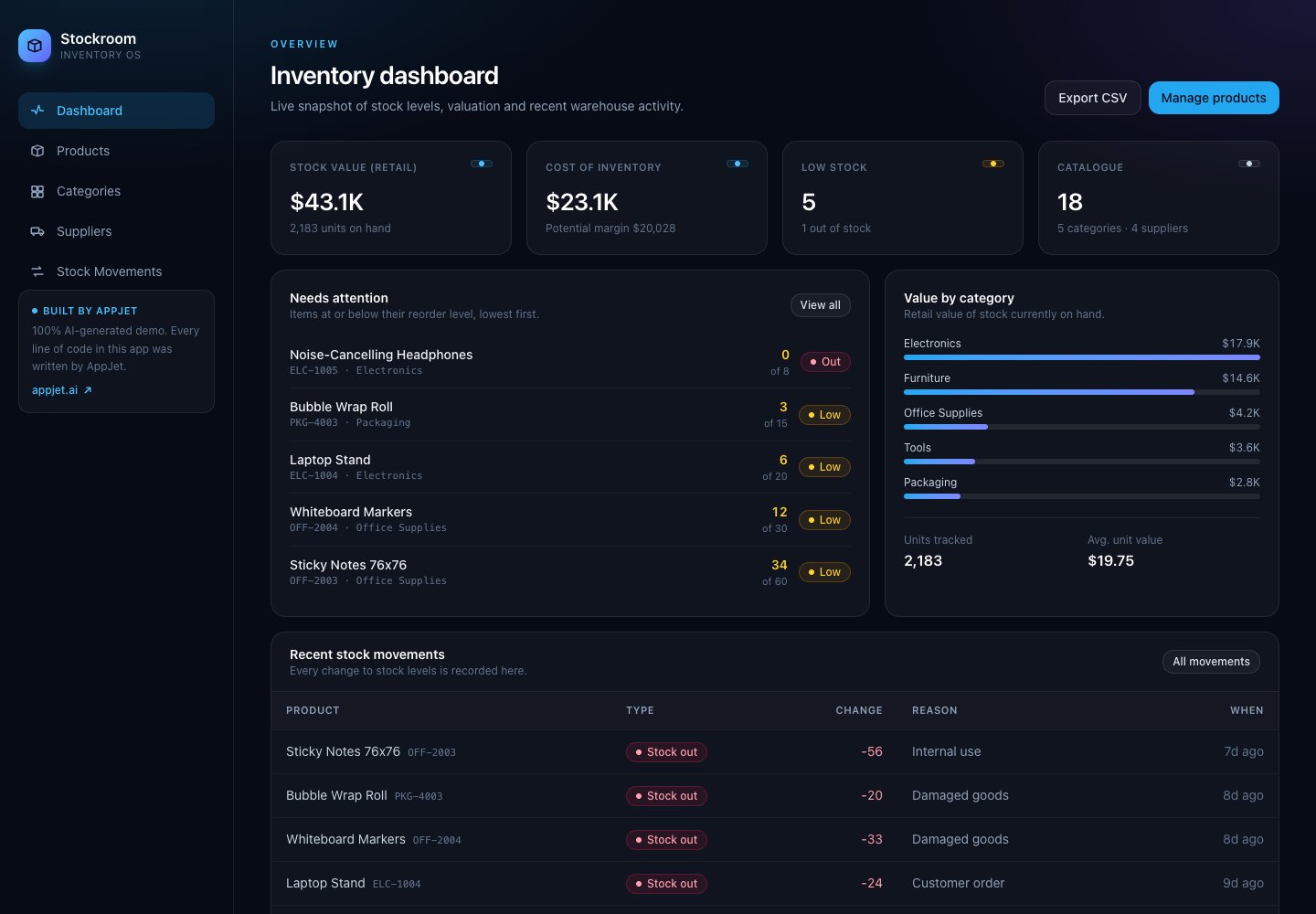
Can you build and deploy a real full-stack inventory app with the AppJet AI app builder on Free? Yes. Stockroom is a working example: a web application with a product catalogue, suppliers, categories, stock movements, dashboard calculations, a SQLite database, and CSV export. It was built and deployed entirely on AppJet Free, without a paid subscription or paid virtual disk.
You can inspect both the result and the code:
This is an AppJet-built demonstration using sample inventory data. We reviewed the live application and its public source on November 5, 2026. The build owner confirmed that development and deployment used only the Free plan.
The brief: create an inventory application
We asked AppJet to create an inventory application. The result, Stockroom, brings the main inventory workflows into one workspace: see what is on hand, find a product, inspect its history, manage suppliers, and export the catalogue.
An inventory app is a useful test of full-stack development because the screens need to agree with each other. A product belongs to a category, may have a supplier, and has a quantity and reorder level. Stock movements affect quantities, which in turn affect the dashboard's totals and alerts. Those relationships need application logic and a database behind the interface.
The public repository contains that implementation: pages, interactive forms, API handlers, database tables, sample data, and a Dockerfile for deployment. Its README identifies the project as generated entirely by AppJet.
What AppJet built
| Area | What Stockroom includes |
|---|---|
| Dashboard | Stock value, inventory cost, units on hand, low-stock and out-of-stock counts, value by category, and recent movements |
| Product catalogue | Search by name or SKU, category and supplier filters, sorting, low-stock filtering, and create/edit/delete controls |
| Product details | SKU, supplier, category, location, prices, reorder level, and stock history |
| Categories and suppliers | Management screens backed by database records and API routes |
| Stock movements | Forms for stock in, stock out, and adjustments, with reasons and references |
| CSV export | A downloadable catalogue containing stock quantities, prices, categories, suppliers, and calculated stock values |
| Deployment | A running web app and a container configuration in the repository |
A dashboard connected to inventory data
The dashboard answers the questions someone managing stock needs first: what needs attention, how many units are available, and where inventory value is concentrated.
At the time of review, the demo displayed 18 products across five categories and four suppliers. Five products were at or below their reorder levels, including one with no stock. These are sample records, not customer usage or business-performance figures.
The numbers come from database queries. The backend sums quantities, calculates inventory cost and retail value, and groups stock by category. Readers can inspect those calculations in lib/repo.ts.
A catalogue you can search and filter
Open Products and search for a name or SKU. You can narrow the list by category or supplier, sort it, and show only items that need replenishment.
For a concrete example, search for ELC-1004. In the reviewed demo, that finds the Laptop Stand. Opening the product shows its stock level, reorder threshold, supplier, location, and movement history. The application connects the overview to the individual records that explain it.
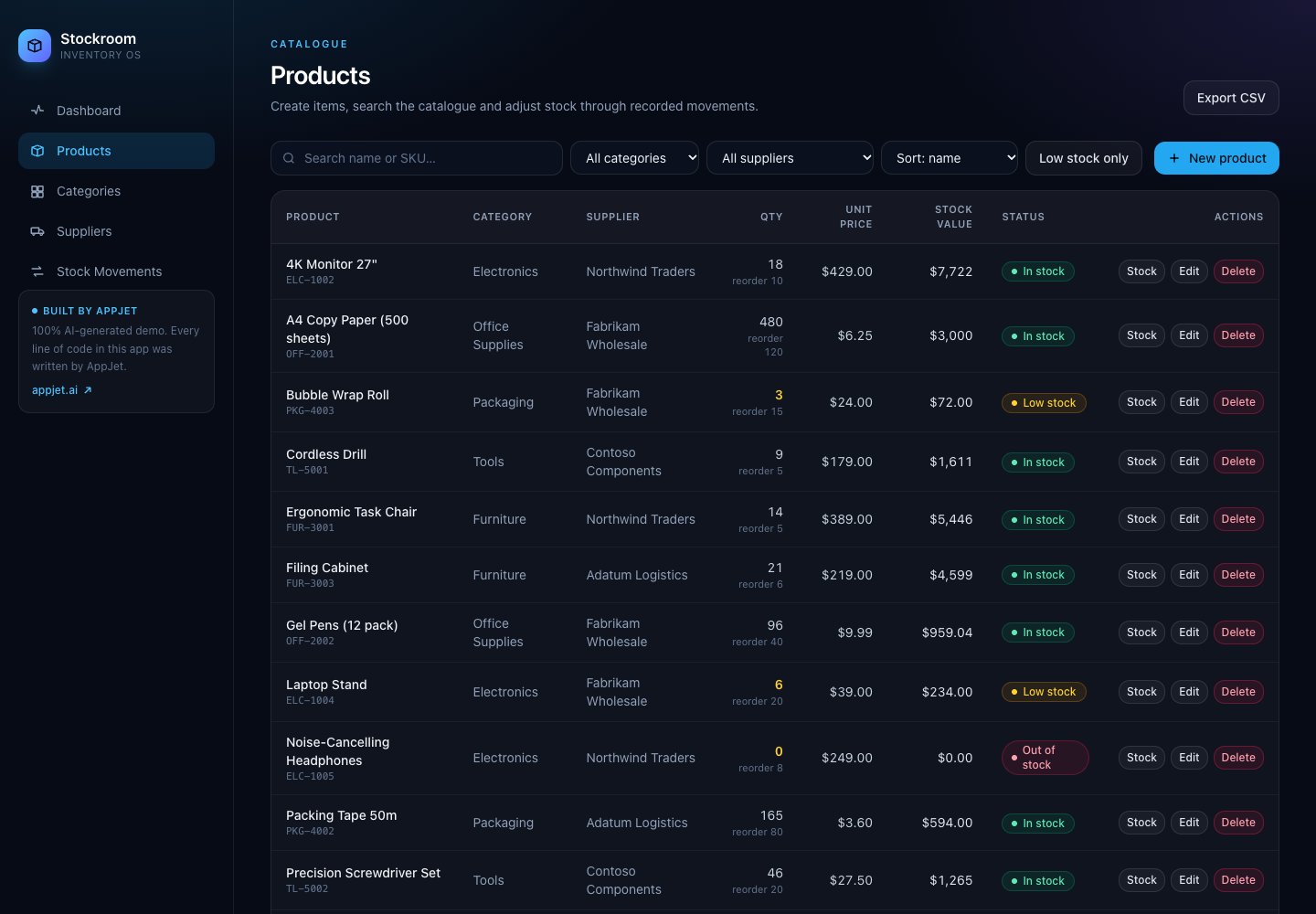
Actual screenshot of the deployed application. The catalogue contains sample data and may change as the public demo is used.
Stock movements with business logic behind the form
Stockroom includes controls for receiving stock, recording outgoing stock, and adjusting the count. A movement can carry a reason and a reference, giving the stock history context.
The movement-creation code checks the product, movement type, and quantity. It also checks that a stock-out request would not leave a negative quantity. It then writes the movement and updates the product quantity inside a database transaction. That is a concrete example of generated backend logic supporting an interactive feature. See the movement implementation and API route.
An export you can use outside the app
The dashboard's Export CSV action downloads the catalogue with SKU, product name, category, supplier, quantity, reorder level, unit price, cost price, stock value, and location.
This gives the application a useful connection back to spreadsheet workflows. You can inspect the CSV endpoint and its source.
What makes this a full-stack application?
Stockroom includes a browser interface, server-side application logic, and a database. The frontend displays and edits inventory records; API routes handle requests; SQLite stores the data used by the pages and dashboard.
| Layer | Implementation in this project |
|---|---|
| Web framework | Next.js 16 with the App Router |
| Interface | React, TypeScript, and Tailwind CSS |
| Backend | Next.js route handlers for products, suppliers, categories, movements, statistics, and export |
| Database | SQLite through better-sqlite3 |
| Packaging | A multistage Docker build with standalone Next.js output |
The database defines four main tables: products, categories, suppliers, and stock_movements. The application initializes its schema and seeds demo data when needed. This version uses SQLite directly; it does not require a separate hosted database service to demonstrate the inventory workflow. See the database implementation, package manifest, and Dockerfile.
What did the Free plan cover?
The AppJet subscription cost for this build and deployment was $0. No paid virtual disk was used. The included coding AI generated the application, and the result is available at the live demo link above.
That is the role of AppJet Free: enough usage for real full-stack development and most coding tasks, including the work needed to turn an idea into a deployed application. You can keep developing on Free after the first version is live.
The AI model is included, so you do not need a separate AI API subscription or additional credits for AppJet's coding agent. Free also includes private projects, GitHub integration, vulnerability scanning, and Cloudflare global edge deployment. This particular project uses a public repository so readers can inspect the implementation. Current AppJet plans.
Free has a weekly usage allowance with no separate daily AI usage cap. It uses the regular model, which can be overloaded during busy periods. This case study demonstrates one completed application; the work your own project needs will determine how much allowance it consumes. How weekly usage works.
From a public demo to your own inventory workflow
Stockroom provides a working foundation you can inspect and extend. Useful next tasks could include purchase-order tracking, barcode entry, or a report organized around your own stock locations.
The reviewed version is a public demo without a sign-in workflow. For private business records, add authentication and permissions, and verify backups and data persistence for your chosen deployment. SQLite writes to a local file; the repository supports configuring its location with DATA_DIR. A Docker volume declaration alone does not establish how a particular host preserves data across rebuilds.
AppJet's virtual disk feature is available on Starter and Pro, and none was used for this demo. You can also design an application around an external database, whose own limits and pricing apply. Those deployment choices are separate from using AppJet Free to build the full-stack application.
Try the result, then build your own
Start with the live dashboard, search the product catalogue, and inspect a product's history. Then open the repository to see the code behind the screens.
Stockroom makes the Free plan's value tangible: an inventory interface, a backend, a database, and a deployed application that readers can examine themselves.
Build your own application with AppJet Free.
Frequently asked questions
Can AppJet Free build a full-stack inventory application?
Yes. Stockroom was built and deployed entirely on AppJet Free. It includes inventory screens, API routes, a SQLite database, stock-movement logic, dashboard calculations, and CSV export. The live demo and public repository are linked above.
Was a paid subscription or virtual disk used for this example?
No. The build owner confirmed that this example used AppJet Free for development and deployment, with no paid virtual disk. Free usage remains subject to its weekly allowance and regular-model availability.
Can I inspect the generated code?
Yes. The inventory-appjet repository is public. It contains the frontend, backend, database schema, demo data, and deployment configuration. Source references in this article point to the revision reviewed on November 5, 2026.
Does this app use Supabase?
No. This example uses SQLite through better-sqlite3. AppJet supports Supabase integration, but it was not used in this implementation.