Developers in a study of 12 participants tackling 27 real errors spent an average of 14 hours 20 minutes understanding and diagnosing errors, followed by 7 hours 11 minutes removing them and preparing patches, according to empirical debugging research. The expensive part wasn't typing the correction. It was establishing what needed correcting.
That's the right way to approach debug codes, whether you're investigating an application error identifier, a stack trace, or unexpected behavior without an error message. Treat each clue as evidence, not a diagnosis. Your job is to build an explanation that can survive a test, especially when you didn't write the code or the failure only happens in production.
Table of Contents
- Why Debugging Takes Longer Than It Should
- The Debugging Process Step by Step
- Narrowing Down Where the Fault Lives
- Debugging Code You Did Not Write
- Diagnosing Failures You Cannot Reproduce Locally
- Verifying a Fix Before You Close the Ticket
Why Debugging Takes Longer Than It Should
A bug can look “fixed” in the diff and still be unproven. The slow part is the evidence work that rarely shows up as activity: reconstructing inputs, following callers across code you did not write, checking which assumptions were inherited, and eliminating explanations that would predict a different failure.
The research review summarizes separate studies rather than one benchmark, so treat the figures as context for specific settings:
- Existing versus fresh defects: one comparison found already-committed defects took a median of 29 minutes to debug, compared with 3 minutes for fresh defects. That measures session length, not where inside the session the time went.
- Editing versus testing: an observational study of 11 professionals recorded 41% of debugging time spent editing and 29% testing. Debugging interleaves change and checking rather than moving through a clean locate-then-fix pipeline.
- Bug classes: a separate breakdown reported semantic bugs at 69.6% of cases, memory bugs at 6.9%, and concurrency bugs at 8.8%. Those are frequencies; without matching per-class time shares, frequency alone cannot prove which class consumed more hours.
The safer inference is narrower: cost depends on how much context you must rebuild and how much evidence you can still trust. An old defect in unfamiliar code can mean reconstructing intent. A production-only failure can deny you a local reproduction altogether.
Practical rule: Separate reproduce, locate, fix, and verify. A ticket marked “debugging” hides which activity is actually consuming your time.
On your next bug, record time against those stages. If locating dominates, better logs, traces, or a clearer repository map may help more than more code generation. If reproduction only exists in production, collect evidence there before patching.
The Debugging Process Step by Step
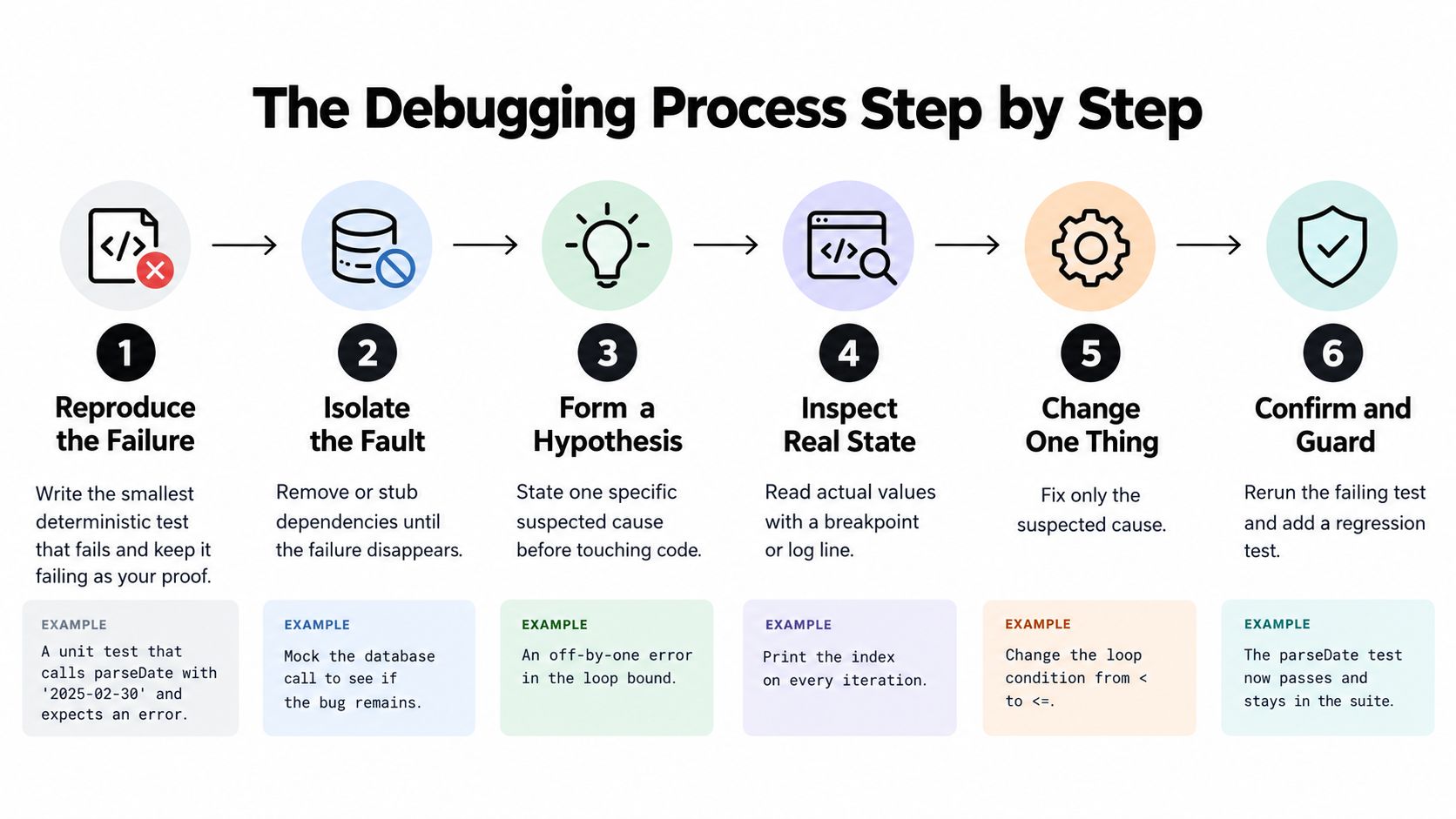
A useful debugging process turns uncertainty into questions you can answer. The research on professional debugging behavior describes a replication, observation, and deduction pattern, with breakpoints, stepped execution, and print or log statements among commonly used techniques.
Establish What Actually Fails
-
Reproduce the smallest deterministic failure. Suppose checkout displays
NaNonly when a coupon accompanies a zero-quantity item. Capture that combination in a test and confirm that the current implementation fails it, so you'll have evidence to evaluate the eventual patch. -
Record the conditions before editing. Save the inputs, runtime version, operating system, configuration flags, complete stack trace, and relevant logs. For the checkout example, preserve the cart structure and coupon settings rather than relying on a screenshot of the total.
-
Write a falsifiable hypothesis. “The discount function returns
undefinedwhen quantity is zero” predicts an observable result; “the coupon code is broken” doesn't. Decide what evidence would reject your explanation before you inspect the function.
For device-specific failures, Capgo's guide to reproduce mobile app bugs is a useful companion when preparing a reproduction record. Keep device and application conditions alongside the failing input rather than scattering them across chat messages.
Inspect, Change, and Explain
-
Instrument the suspected path. Set a breakpoint, step through the calculation, add an assertion, or log a narrowly selected value. Inspect the discount function's actual return value before changing its handling of empty quantities.
-
Change one variable at a time. Modify only the suspected behavior, then rerun the failing test and regression suite. Don't upgrade dependencies and rewrite the calculation in the same experiment, because you won't know which change affected the result.
-
Write the confirmed cause in a sentence. For this hypothetical checkout defect, that might be: “The empty-quantity branch returned no discount value, and the caller used that result in arithmetic.” If the evidence doesn't support that sentence, keep the explanation provisional.
The test should assert the intended business behavior, not merely the absence of NaN. Returning an arbitrary total can silence the symptom while leaving checkout incorrect.
A useful hypothesis tells you what to inspect and what result would prove you wrong.
Two habits undermine this process: changing several components simultaneously and skipping the initial reproduction. The former makes results hard to attribute; the latter leaves you waiting for the next occurrence to discover whether anything improved.
Narrowing Down Where the Fault Lives
Pick the observation method by deciding what evidence would falsify your current suspect. A debugger can expose the state inside a calculation; it can also disturb timing, so the tool has to match the failure mode. If pausing changes the symptom, observation has become part of the experiment.
Fault-finding techniques compared
| Technique | Best used when | Effort | Main risk |
|---|---|---|---|
| Breakpoints | Stopping at a suspect function to inspect its state | Low, needs a debugger | Only covers the path you guessed |
| Step execution | Tracing how a value changes across lines | Low to moderate | Slow inside long loops or large call chains |
| Print or log statements | Timing and concurrency bugs where pausing hides the symptom | Low, needs cleanup afterwards | Noise and sensitive-data exposure |
| Assertions | Confirming invariants such as a non-negative total | Low | Only catches conditions you wrote down |
| Spectrum-based ranking | A failing test among passing tests, with coverage data | Moderate, needs coverage tooling | The top-ranked line may not be faulty; weak tests distort rankings |
Match the Tool to the Uncertainty
Use a breakpoint when you know which function deserves inspection but don't know its state. Step execution helps when the problem is a value's transformation across statements, although following a long loop manually can become an unproductive exercise.
Targeted logs carry a cost: extra output adds noise, and recording entire request objects can expose data you never needed. Use them when you need to observe execution without deliberately stopping it.
Assertions make assumptions explicit. A non-negative-total assertion can identify where an invariant stops holding, but it won't tell you whether the pricing policy itself is correct. Keep that distinction visible in your error-handling approach, so a reported symptom doesn't become an unsupported root-cause claim.
Use Rankings as a Search Aid
Spectrum-based fault localization compares coverage from passing and failing tests to rank suspicious lines. Collect representative tests, instrument coverage, calculate the ranking, and inspect candidates against the observed failure.
On Defects4J, evaluated techniques localized at most about 40% of bugs within the first 10 ranked lines, 80% within the first 100, and 90% within the first 1,000; even the strongest metric required roughly 450 lines to reliably reach 90%, while a separate embedded-software study found only 30 of 47 bugs, or 63.83%, as described in the fault-localization research.
The ranking is triage rather than proof. Weak test diversity can make innocent shared code look suspicious, and a high rank still needs a focused check that can fail before you call it the cause.
Debugging Code You Did Not Write
In 2025, 45.2% of developers surveyed said debugging AI-generated code was more time-consuming, according to Stack Overflow's Developer Survey. That doesn't establish why every respondent struggled, but it challenges the assumption that generating a patch necessarily reduces the work needed to trust it.
Check Behavior Beyond the Reported Symptom
Consider a generated checkout fix that compiles successfully but changes how discounts apply to bundles. Inspect the shared pricing path and compare bundle behavior before and after the patch; successful compilation doesn't answer a business-rule question.
A different failure might produce a stack trace inside a dependency wrapper, while production uses a differently pinned dependency version. Read the path the trace executed, compare deployed versions with the repository's lockfile, and test the suspected mismatch before rewriting the wrapper.
An inherited repository presents another difficulty: the code may rely on secret configuration or database state that isn't visible in a function definition. Check whether required configuration exists without printing its value, and use sanitized fixtures that preserve relevant relationships rather than copying private records.
Make Explanations Reviewable
For unfamiliar code, require the reviewer to identify:
- The executed path: Which caller, branch, and dependency participated in the failure?
- The evidence: Which observation distinguishes the proposed cause from alternatives?
- The behavior contract: What must remain unchanged for related callers?
Apply the same standard during code review of an unfamiliar change. An AI explanation is a hypothesis with a test attached, not authority. Reject a patch you can't explain in your own words.
At AppJet, we can connect an existing GitHub repository so AI-assisted changes use its project structure, components, and business logic as context. Keep the failing test as your merge gate, regardless of how the proposed change was produced.
Diagnosing Failures You Cannot Reproduce Locally
The failure has disappeared by the time you inspect it. It occurred under real traffic, in a particular region, or against production data your laptop doesn't have.
Don't immediately simplify the environment until the symptom vanishes. Preserve the original context and choose evidence according to the question you're trying to answer.
Production evidence and what each one answers
| Evidence | What it answers | Privacy or safety note |
|---|---|---|
| Correlation ID | Which frontend, API, database, and edge events belong to a failed request | Generate per request; never use session tokens |
| Distributed trace | Which service or dependency added latency or returned an error | Sample traces; strip personal data from query parameters |
| Time-windowed logs | What changed shortly before the first error | Redact emails, card numbers, and authentication headers |
| Metrics and error rates | Whether impact appears widespread or limited to a tenant or region | Prefer aggregation; review identifying labels |
| Non-breaking live breakpoint | Actual variable values at the failing line without a redeploy | Capture named fields only; time-box and remove it |
Find the Boundary Where Behavior Changed
Start by distinguishing an application exception from an infrastructure or dependency failure. Did your application construct invalid input, did the database reject a valid operation, or did an upstream API fail before your handler could complete?
Follow the correlation ID across boundaries rather than searching every service for the same error text. The same visible debug code may be a downstream representation of a different failure.
Pull a narrow log window beginning before the first known error, then widen it when the evidence warrants it. Compare deployment, configuration, and dependency events within that window instead of reviewing an entire day's output.
Capture State Without Recreating the Incident
Dynatrace introduced live-debugging capabilities in February 2025 to collect code-level incident data without requiring reproduction or redeployment, according to SiliconANGLE's coverage of its observability updates. That's a useful approach, but the implementation is tool-specific, so check your platform's capture controls and operational limitations.
Production safeguard: Collect the smallest amount of state that can distinguish competing explanations.
Redact sensitive fields before diagnostic output leaves the service. Write rollback criteria before releasing a change, using an agreed observation window and a trigger tied to the affected route or operation. Don't improvise the definition of acceptable behavior while an incident is unfolding.
Verifying a Fix Before You Close the Ticket
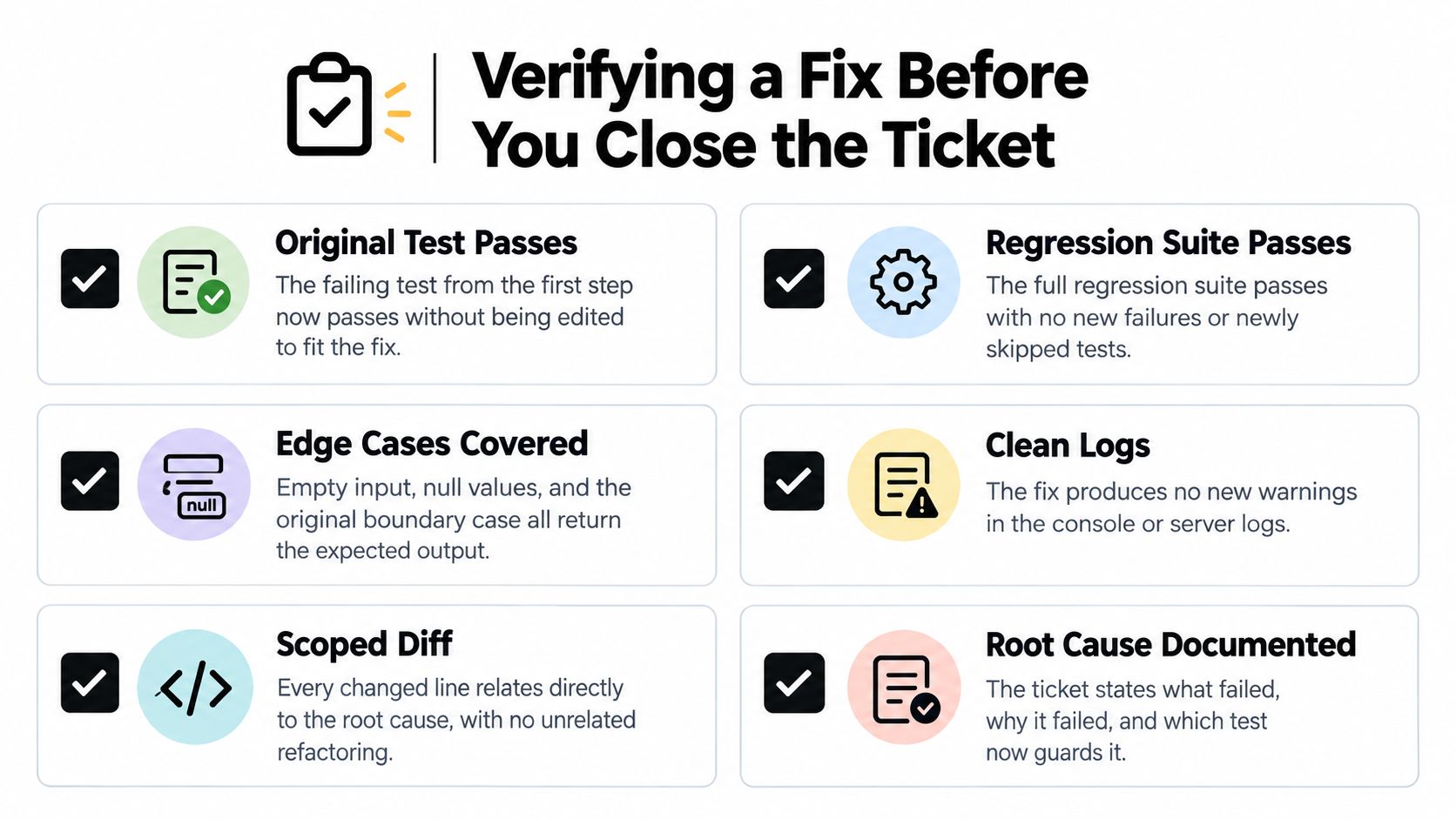
A patch is ready when you can show that it corrects the failure without violating the surrounding behavior. Treat verification as a set of pass conditions, not a final glance at the build status.
Require Observable Pass Conditions
- Original failure resolved: The preserved failing test now passes without changing its expected result to accommodate the implementation.
- Regression suite completed: The full suite passes. Record any skipped test and its reason, and don't treat unexecuted coverage as evidence.
- Diff reviewed: Every changed line contributes to the confirmed cause or its regression coverage. Separate unrelated formatting and refactoring.
- Affected environment checked: Exercise the scenario with the runtime, configuration, and data shape associated with the incident. Record any environment differences you couldn't eliminate.
- Adjacent behavior preserved: Check another caller or related branch, including relevant empty inputs, null values, and boundary conditions.
- Release observed: Review error rates and logs over the diagnostic observation window. Keep the rollback trigger explicit and accessible to whoever monitors the release.
Use testing automation tools to make these checks repeatable, but inspect what the suite asserts. A test that checks only for a successful response can miss a wrong total, an omitted database update, or an incorrect permission decision.
Don't Confuse Silence With Correctness
A green build isn't behavioral proof. It establishes only what the build process checks, so connect acceptance to the original failure and the intended outcome.
Catching an exception isn't necessarily a repair. If the operation still fails but the application suppresses the evidence, you've made diagnosis harder. Confirm that any fallback preserves the behavior users depend on.
Deleting the reproduction removes the guard. Keep it in the suite with a name that describes the condition it protects, rather than a vague reference to a ticket.
Finish with a short debugging note containing reproduction steps, the hypothesis, decisive evidence, the confirmed cause, and the verification result. The next maintainer should be able to evaluate the change without reconstructing your entire investigation.
AppJet brings AI-assisted coding, GitHub connectivity, database integration, and deployment into one workspace for new applications and existing repositories. Visit AppJet, connect your project, and describe a reproducible bug so you can evaluate a proposed change against the evidence and tests you've collected.